
Choosing a local model
Which Local AI Model to Download on Android
A local AI model is the biggest download most people ever put on a phone — from under half a gigabyte to nearly four. Picking the right one decides how fast answers arrive, how good they are, and whether your phone copes at all.
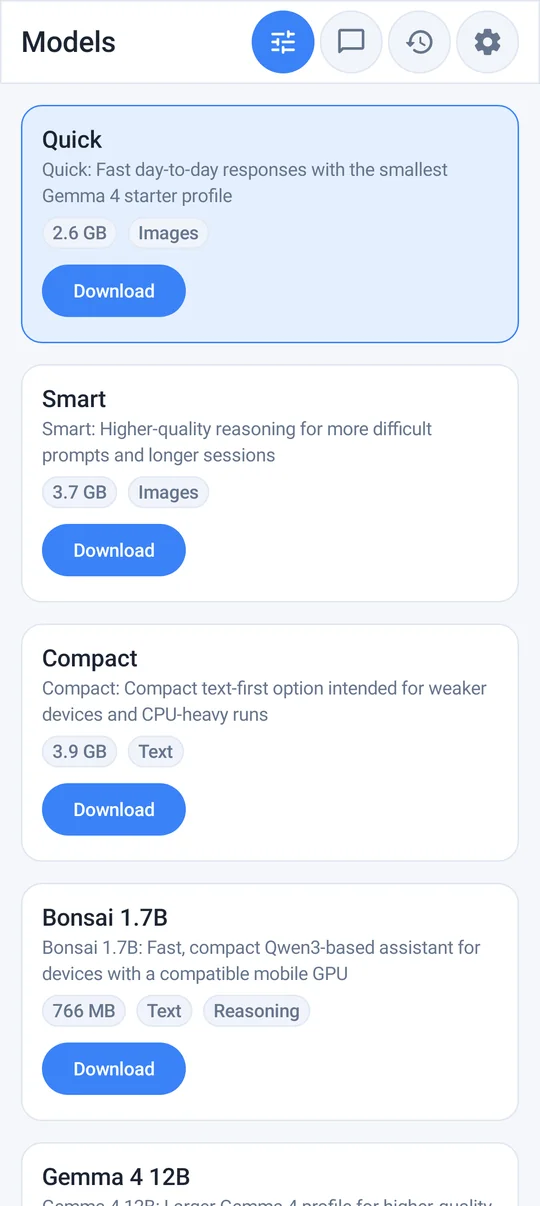
The free models at a glance
| Model | Based on | Download | Best for |
|---|---|---|---|
| Tiny v2 | Granite 4.0 350M | ~468 MB | Older or low-memory phones, quick rewrites and short answers |
| Quick | Gemma 4 E2B | ~2.6 GB | A good everyday balance of speed and quality |
| Smart | Gemma 4 E4B | ~3.7 GB | Better reasoning and longer, more careful answers on capable phones |
| Bonsai 1.7B | Ternary Bonsai (Qwen3-based) | ~766 MB | Fast, compact chat on phones with a compatible mobile GPU |
| Compact | Phi-4 Mini | ~3.9 GB | Structured tasks, maths and step-by-step explanations |
Premium adds further models, including Gemma 4 12B, Qwen2-VL-2B for images, DeepSeek R1 1.5B, Qwen2.5 1.5B, Qwen2.5 Coder 3B and Qwen3 0.6B, plus FLUX.2 for on-device image generation where supported. Sizes are approximate.
Let the device check recommend one
Offline AI Chat Private has an optional device check that looks at your phone and suggests a suitable model. It is a sensible starting point — you can skip it and choose any compatible model yourself.
Rules of thumb for RAM and storage
- Storage: you need the download size plus extra free space for installation and preparation. Keep at least a few gigabytes free beyond the model itself, or Android may start struggling with everything else.
- Memory: the model has to fit in RAM alongside Android and your other apps. As a rough guide, the ~2.6 GB model is comfortable on phones with 8 GB of RAM or more; the ~3.7–3.9 GB models run best on 8–12 GB phones. On 4–6 GB phones, start with Tiny.
- Download on Wi-Fi. These are large files; a mobile-data download can be slow and expensive.
Speed: CPU or GPU?
The app runs models with Google's LiteRT / LiteRT-LM backend. Auto uses the CPU by default because it is the most stable across devices. On compatible phones you can select the GPU, or enable experimental GPU probing, which can make generation noticeably faster. If you see errors or instability on GPU, switch back to CPU. Image analysis needs a vision-capable model and a working GPU runtime.
Which one should you start with?
- Not sure? Run the device check and accept its suggestion.
- Mid-range phone, everyday use: Quick.
- Flagship phone, longer writing or studying: Smart.
- Maths, logic, step-by-step: try Compact.
- Older phone or very little storage: Tiny.
You can install more than one model if you have the space, and compare them on the same prompt.
Smaller models make more mistakes. All local models can be confidently wrong, and small ones more so. Use them for drafting, rewriting and thinking out loud — and check facts, figures and anything important against a reliable source.
What still needs the internet
After a model is downloaded, chat and inference run on the phone and work offline. You still need a connection for app updates, model downloads, Google Play purchases or restores, and optional diagnostics. Local models also have no live web access, so they do not know recent news.
Frequently asked questions
How big are offline AI models for Android?
In Offline AI Chat Private the free models range from about 468 MB (Tiny v2) to about 3.9 GB (Compact, Phi-4 Mini). You also need extra free storage beyond the download.
Which local AI model is best for my phone?
Run the optional device check for a recommendation. As a rule of thumb, Quick suits most mid-range phones, Smart suits flagships, and Tiny suits older or low-memory phones.
Should I use CPU or GPU for local AI?
Auto uses the CPU by default for stability. On compatible phones, selecting the GPU can be faster; switch back to CPU if you see errors.
Sources and further reading
How this article was created
This article was drafted with the help of artificial intelligence and edited against the app's published feature list. The independent developer is responsible for publication and accepts correction reports. Verify health, safety, legal, financial and official requirements with a primary source or qualified professional.
Questions and corrections: brightwaveapp@gmail.com. Legal and privacy information.